Transmission (Tx) Power Control
These settings control the real-time transmission power control functionality for the cdma2000 signal.
|
1.Tx Power Control Settings |
2.Absolute Power Levels |
|---|---|
|
|
|
|
|
|
|
|
|
|
|
|
|
|
|
|
|
1.Tx Power Control Settings
State
Choice: Off | On
Default: Off
Enables or disables the transmission power control.
[:SOURce]:RADio:CDMA2000[:BBG]:REVerse:TPControl[:STATe] 1|0|ON|OFF
[:SOURce]:RADio:CDMA2000[:BBG]:REVerse:TPControl[:STATe]?
Maximum Power
Default: 0 dB
Indicates the maximum power in dB for transmission power control limit.
[:SOURce]:RADio:CDMA2000[:BBG]:REVerse:TPControl:POWer:MAXimum?
Minimum Power
Range: –40 to 0 (dB)
Default: –40 dB
Sets the minimum power in dB. The down power control is ignored when the transmission power is reached this power level.
[:SOURce]:RADio:CDMA2000[:BBG]:REVerse:TPControl:POWer:MINimum <val>
[:SOURce]:RADio:CDMA2000[:BBG]:REVerse:TPControl:POWer:MINimum?
Initial Power
Range: -40 to 0 (dB)
Default: 0 dB
Sets the initial power in dB. The value must be bigger than or equal to the value set in Minimum Power.
[:SOURce]:RADio:CDMA2000[:BBG]:REVerse:TPControl:POWer:INITial <val>
[:SOURce]:RADio:CDMA2000[:BBG]:REVerse:TPControl:POWer:INITial?
Power Step
Range: 0.1 to 10
Default: 1
Sets the power step of Transmission Power Control in dB.
[:SOURce]:RADio:CDMA2000[:BBG]:REVerse:TPControl:POWer:STEP <val>
[:SOURce]:RADio:CDMA2000[:BBG]:REVerse:TPControl:POWer:STEP?
Up/Down Pattern
Choice: User Data| External
Default: External1
Select the transmission power control up/down pattern.
|
External |
Sets the Transmission Power Control (TPC) data pattern to External. This choice specifies an external TPC pattern. |
|
User Data| |
Sets the Transmission Power Control (TPC) data pattern to User Data|. The value of this command is a string which is represented ‘0’ or ‘1’. The maximum data length is 3,840 patterns. |
[:SOURce]:RADio:CDMA2000[:BBG]:REVerse:TPControl:PATTern|<file name>|EXTernal
[:SOURce]:RADio:CDMA2000[:BBG]:REVerse:TPControl:PATTern?
Data
Click on the  on the right hand side to open the following
  Up/Down Pattern Dialog Box.
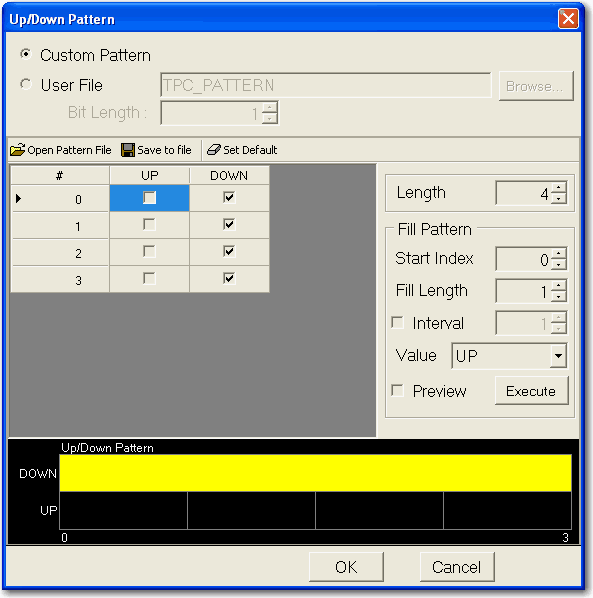
Set the data of the channel. In the User File case, 0,1 txt file or binary file can be selected as the data source.
[:SOURce]:RADio:CDMA2000[:BBG]:REVerse:TPControl:PATTern|<file name>|EXTernal
[:SOURce]:RADio:CDMA2000[:BBG]:REVerse:TPControl:PATTern?
External Data Input Port
When AUX port is multiplexed mode:
Choice: AUX1 | AUX2 | AUX3 | AUX4 | AUX5 | AUX6 | AUX7 | AUX8 | AUX9 | AUX10 | AUX11 | AUX12
Default: AUX1
When AUX port is dedicated mode:
Choice: BIT 0 | BIT 1 | BIT 2 | BIT 3 | BIT 4 | BIT 5 | BIT 6 | BIT 7
Default: BIT 0
Select the AUX port or bit as transport power control data input.
[:SOURce]:RADio:CDMA2000[:BBG]:REVerse:TPControl:PATTern[:EXTernal]:INPut | AUX1| AUX2| AUX3| AUX4| AUX5| AUX6| AUX7| AUX8| AUX9| AUX10| AUX11| AUX12| AUX13| AUX14| AUX15| AUX16
[:SOURce]:RADio:CDMA2000[:BBG]:REVerse:TPControl:PATTern[:EXTernal]:INPut?
External Data Input Polarity
When AUX port is multiplexed mode:
Choice: AUX0 | AUX1 | AUX2 | AUX3 | AUX4 | AUX5 | AUX6 | AUX7 | AUX8 | AUX9 | AUX10 | AUX11
Default: AUX0
When AUX port is dedicated mode:
Choice: BIT 0 | BIT 1 | BIT 2 | BIT 3 | BIT 4 | BIT 5 | BIT 6 | BIT 7
Default: BIT 0
Select the AUX port or bit as transport power control data input.
[:SOURce]:RADio:CDMA2000[:BBG]:REVerse:TPControl:PATTern[:EXTernal]:POLarity POSitive|NEGative
[:SOURce]:RADio:CDMA2000[:BBG]:REVerse:TPControl:PATTern[:EXTernal]:POLarity?
Absolute Maximum Power
Gets the absolute Maximum power in dBm.
[:SOURce]:RADio:CDMA2000[:BBG]:REVerse:TPControl:ABS:MAXimum?
Absolute Minimum Power
Gets the absolute minimum power in dBm.
[:SOURce]:RADio:CDMA2000[:BBG]:REVerse:TPControl:ABS:MINimum?
Absolute Initial Power
Gets the absolute Initial power in dBm.
[:SOURce]:RADio:CDMA2000[:BBG]:REVerse:TPControl:ABS:INITial?